


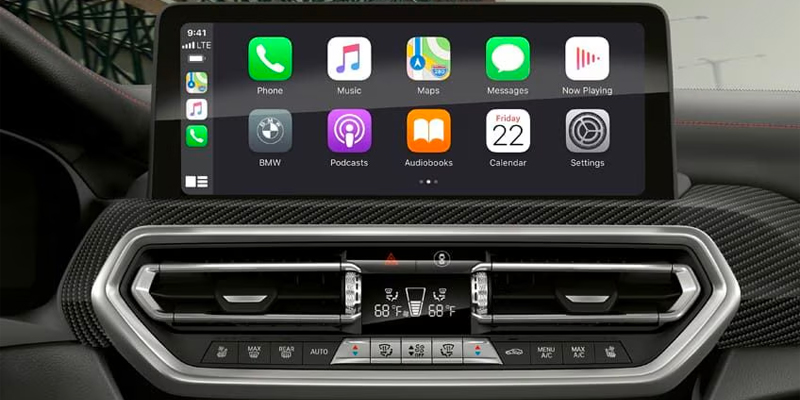
Apple CarPlay BMW integration allows you to connect your iPhone seamlessly with your vehicle, giving you access to navigation, music, calls, and more—all while keeping your focus on the road. For drivers in Fresno, California, this guide will walk you through the Apple CarPlay setup process, ensuring you can fully enjoy the innovative BMW infotainment system.
What is Apple CarPlay and Why it’s a Must-Have in Your BMW
Apple CarPlay BMW connectivity transforms your driving experience by integrating your iPhone with your car’s infotainment system. With Apple CarPlay, you can use apps like Apple Maps, Spotify, and Messages directly from the BMW infotainment system, without ever needing to pick up your phone.
BMW tech features like the advanced touchscreen display and voice-activated controls make Apple CarPlay even more intuitive. Whether you’re navigating Fresno’s streets or heading out on a road trip, Apple CarPlay ensures you stay connected while keeping your eyes on the road.
Step-by-Step Guide to Apple CarPlay Setup in Your BMW
Setting up Apple CarPlay in your BMW is straightforward and can be done in just a few minutes. Here’s how:
1. Check Compatibility: First, ensure your BMW supports Apple CarPlay. Most new BMW models, like the BMW X5 xDrive40i or the BMW 330i xDrive, come equipped with this feature.
2. Enable Bluetooth: Turn on Bluetooth on your iPhone and your BMW infotainment system. This step is crucial for wireless Apple CarPlay setup.
3. Pair Your iPhone with BMW Bluetooth Setup: Go to your BMW’s iDrive menu, select ‘Connections,’ and then ‘Mobile Devices.’ Choose ‘Connect New Device’ and pair your iPhone via Bluetooth.
4. Activate Apple CarPlay: Once paired, select ‘Apple CarPlay’ from the iDrive menu. Follow the on-screen instructions to complete the setup.
5. Enjoy Apple CarPlay: After setup, your BMW infotainment system will display a familiar Apple interface, allowing you to use your favorite apps hands-free.
If you encounter any issues, BMW Fresno offers expert assistance to ensure your Apple CarPlay setup runs smoothly.
BMW Infotainment System Features You’ll Love
The integration of Apple CarPlay BMW functionality is just one of the many impressive BMW tech features available. The BMW infotainment system includes:
– Voice Command Capabilities: Activate Siri to make calls, send texts, or get directions hands-free.
– High-Resolution Touchscreen: Easily navigate between apps and settings.
– Wireless Connectivity: Enjoy Apple CarPlay without the need for cables, enhancing convenience and reducing clutter.
If you’re exploring the latest BMW models in Fresno, CA, such as the 2026 BMW X3 xDrive30i or the all-electric BMW i4, you’ll find these tech features elevate your driving experience.
Tips for Optimizing Your Apple CarPlay Experience
To get the most out of Apple CarPlay BMW features, consider these helpful tips:
– Keep Your iPhone Updated: Ensure your iPhone is running the latest iOS version for optimal compatibility.
– Customize CarPlay Settings: Rearrange app icons and enable Do Not Disturb mode while driving for a personalized and distraction-free experience.
– Explore BMW iPhone Setup Tips: Delve into additional features like syncing your contacts or saving favorite destinations for easier navigation around Fresno.
Whether you’re commuting locally or heading into the California countryside, Apple CarPlay enhances safety and convenience for every journey.
Visit BMW Fresno Today:
Apple CarPlay BMW integration is an essential feature for modern drivers in Fresno, CA, providing seamless access to your favorite apps and functions while on the road. Setting it up is easy and unlocks a world of convenience through your BMW infotainment system.
To explore the latest BMW models equipped with Apple CarPlay or receive assistance with your BMW Bluetooth setup, visit BMW Fresno today. Enjoy all the advanced features and innovation BMW has to offer with confidence.
Connect with us


- June 2026
- May 2026
- April 2026
- March 2026
- February 2026
- January 2026
- December 2025
- November 2025
- October 2025
- September 2025
- August 2025
- July 2025
- June 2025
- May 2025
- April 2025
- March 2025
- February 2025
- January 2025
- December 2024
- November 2024
- September 2024
- June 2024
- May 2024
- March 2024
- February 2024
- October 2022
- August 2022
- July 2022
- June 2022
- May 2022
- April 2022
- March 2022
- February 2022
- December 2021
- November 2021
- September 2021
- August 2021
- March 2021
- December 2020
- November 2020
- August 2020
- May 2020
- April 2020
- March 2020
- November 2018
- October 2018
- September 2018
- August 2018
- July 2018
- June 2018
- May 2018
- April 2018
- March 2018
- February 2018
- December 2017
- November 2017
Archives
- 2025 BMW EV Vehicles
- 2026 BMW 3 Series
- 2026 BMW 3 Series Fresno, CA
- 2026 BMW 3 Series Performance
- 2026 BMW 3 Series Techonolgy
- 2026 BMW 7 Series
- 2026 BMW i7
- 2026 BMW i7 Fresno, CA
- 2026 BMW i7 vs 2026 BMW 7 Series
- 2026 BMW X3
- 2026 BMW X3 Driver Assistance
- 2026 BMW X3 Safety Features
- 2026 BMW X3 Upgrades
- 2026 BMW X5
- 2026 BMW X5 Trim Levels
- 2026 BMW X7
- 2026 BMW X7 Fresno
- 2026 BMW X7 Trim Levels
- 2026 Fuel Efficient BMW
- 2026 Fuel Efficient BMW Models
- 2026 Fuel Efficient Luxury Cars
- BMW Air Filters
- BMW Apple Technology
- BMW Brake Fluid Fresno, CA
- BMW Brakes Fresno, CA
- BMW Certified Pre‑Owned Vehicles
- BMW Finance Fresno, CA
- BMW First Responders Discount
- BMW First Responders Discount Fresno, CA
- BMW First Responders Program
- BMW Frenso
- BMW Fresno
- BMW Fresno Service
- BMW Help Fresno, CA
- BMW Lease Fresno, CA
- BMW Loan Fresno, CA
- BMW Loan VS. Lease
- BMW Maintenance Fresno, CA
- BMW Model Features
- BMW Oil Change Fresno, CA
- BMW Service Center Fresno, CA
- BMW Spring Maintenance Tips
- BMW Transmission Fresno, CA
- BMW Wiper Fluid Fresno, CA
- BMW X5 Fresno, CA
- BMW X7 For Sale Fresno, CA
- Brake Fluid Fresno, CA
- Car Air Filters Fresno, CA
- Car Spring Maintenance Tips
- Fleet
- Fresno BMW Dealer
- Fresno, CA BMW Dealer
- Fresno, CA BMW EV Vehicles
- Fresno, CA BMW Service Center
- Fresno, CA BMW Tires
- Fresno, CA EV Luxury Vehicles
- How To Connect Your iPhone To Your BMW
- How to Set Up Apple CarPlay in Your BMW
- Luxury Auto Lease Fresno, CA
- Luxury Auto Loans Fresno, CA
- New BMW 3 Series Fresno, CA
- New BMW 7 Series
- New BMW EV Vehicles
- New BMW i7 Fresno, CA
- New BMW X3 Fresno, CA
- New Inventory
- News
- People
- Rolling Hills BMW Dealer
- Rolling Hills BMW Service
- Rolling Hills Used Cars
- Service
- Social
- Tire Shop Fresno, CA
- Trade Ins Fresno, CA
- Uncategorized
- Used BMW i7 Fresno, CA
- Used Car Trade In Fresno, CA
- Wiper Fluid Fresno, CA