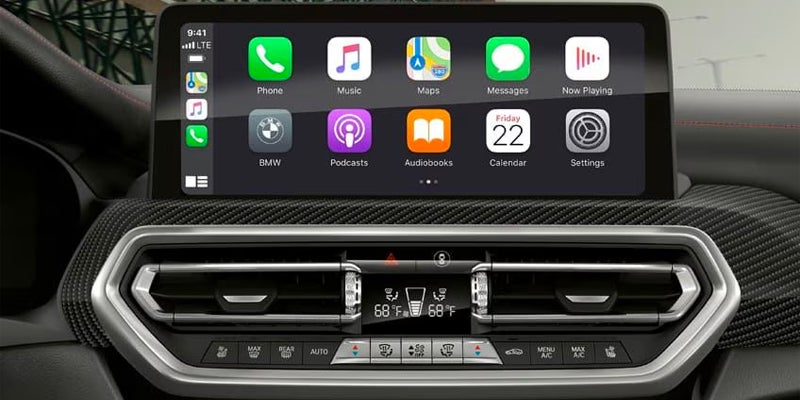


Apple CarPlay BMW integration allows you to connect your iPhone seamlessly with your vehicle, giving you access to navigation, music, calls, and more—all while keeping your focus on the road. For drivers in Fresno, California, this guide will walk you through the Apple CarPlay setup process, ensuring you can fully enjoy the innovative BMW infotainment system. What is Apple CarPlay and Why it’s a Must-Have in Your BMW Apple CarPlay BMW connectivity transforms your driving experience by integrating your iPhone with your car’s infotainment system. With Apple CarPlay, you can use apps like Apple Maps, Spotify, and Messages directly from the BMW infotainment system, without ever needing to pick up your phone. BMW tech features like the advanced touchscreen display and voice-activated controls make Apple CarPlay even more intuitive. Whether you're navigating Fresno’s streets or heading out on a road trip, Apple CarPlay ensures you stay connected while keeping your eyes on the road. Step-by-Step Guide to Apple CarPlay Setup in Your BMW Setting up Apple CarPlay in your BMW is straightforward and can be done in just a few minutes. Here’s how: 1. Check Compatibility: First, ensure your BMW supports Apple CarPlay. Most new BMW models, like the BMW X5 xDrive40i or the BMW 330i xDrive, come equipped with this feature. 2. Enable Bluetooth: Turn on Bluetooth on your iPhone and your BMW infotainment system. This step is crucial for wireless Apple CarPlay setup. 3. Pair Your iPhone with BMW Bluetooth Setup: Go to your BMW's iDrive menu, select 'Connections,' and then 'Mobile Devices.' Choose 'Connect New Device' and pair your iPhone via Bluetooth. 4. Activate Apple CarPlay: Once paired, select 'Apple CarPlay' from the iDrive menu. Follow the on-screen instructions to complete the setup. 5. Enjoy Apple CarPlay: After setup, your BMW infotainment system will display a familiar Apple interface, allowing you to use your favorite apps hands-free. If you encounter any issues, BMW Fresno offers expert assistance to ensure your Apple CarPlay setup runs smoothly. BMW Infotainment System Features You’ll Love The integration of Apple CarPlay BMW functionality is just one of the many impressive BMW tech features available. The BMW infotainment system includes: - Voice Command Capabilities: Activate Siri to make calls, send texts, or get directions hands-free. - High-Resolution Touchscreen: Easily navigate between apps and settings. - Wireless Connectivity: Enjoy Apple CarPlay without the need for cables, enhancing convenience and reducing clutter. If you’re exploring the latest BMW models in Fresno, CA, such as the 2026 BMW X3 xDrive30i or the all-electric BMW i4, you’ll find these tech features elevate your driving experience. Tips for Optimizing Your Apple CarPlay Experience To get the most out of Apple CarPlay BMW features, consider these helpful tips: - Keep Your iPhone Updated: Ensure your iPhone is running the latest iOS version for optimal compatibility. - Customize CarPlay Settings: Rearrange app icons and enable Do Not Disturb mode while driving for a personalized and distraction-free experience. - Explore BMW iPhone Setup Tips: Delve into additional features like syncing your contacts or saving favorite destinations for easier navigation around Fresno. Whether you’re commuting locally or heading into the California countryside, Apple CarPlay enhances safety and convenience for every journey. Visit BMW Fresno Today: Apple CarPlay BMW integration is an essential feature for modern drivers in Fresno, CA, providing seamless access to your favorite apps and functions while on the road. Setting it up is easy and unlocks a world of convenience through your BMW infotainment system. To explore the latest BMW models equipped with Apple CarPlay or receive assistance with your BMW Bluetooth setup, visit BMW Fresno today. Enjoy all the advanced features and innovation BMW has to offer with confidence.